Design Brief: Using AI to Build Reusable CAD Tools
For many design engineers, collaboration still begins with a file. The process is familiar: A model is saved, uploaded, shared, checked out or copied before someone else can work on it. Yet the process can also create version confusion and discourage experimentation.
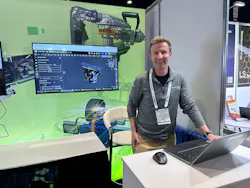
In the accompanying video, Kevin Cowles, Senior Technical Services Engineer, OnShape by PTC, demonstrates how the OnShape platform combines CAD and product data management (PDM) in a cloud environment. “From the very beginning of Onshape, it provides you with the opportunity to eliminate the separation between where you’re storing your work and where you’re working on it,” Cowles said.
The upgrade from traditional CAD workflows enables a user to work directly on the model. And rather than passing copies between systems, a built-in PDM automatically records design history and supports versioning, branching and merging.
Too Many Copies, Too Many Handoffs
File-based CAD workflows are not necessarily a barrier to individual design work. Challenges arise when several people need to work on that design at the same time, or when teams want to evaluate or explore multiple concepts without creating duplicate files. And although a shared drive or PDM system is useful to organize design data, it does not always create a real-time collaborative environment. Engineers may still need to wait for access, reconcile changes or determine which version contains the latest edits.
Cowles noted that those challenges become more pronounced when product development involves distributed engineering teams, suppliers, manufacturing partners and simulation specialists. Moreover, for companies introducing AI into the design process, it raises the question of how an AI tool can work with current product data without generating another disconnected copy.
“Essentially, every other system requires files to be on your computer in order to work on them,” Cowles said. “In Onshape, because you’re always working directly on the model on Onshape’s cloud servers, this enables direct and live collaboration.”
Multiple Users Work Directly in the Live Model
In the demonstration, Cowles shows how a second user joins the design environment. That user is not receiving a downloaded copy or a static view of the assembly. “They’re actually joining me live in this model,” he said. “And if I did something like delete the top, of course, that data is live for both users.”
For a design team, the benefit of having two people see the same geometry is manifold. Engineers can work in parallel, add comments and markups in context and make changes without waiting for another user to finish working in the file. The approach also changes how teams can handle uncertainty. Instead of treating every design change as something that must be made cautiously in the main model, engineers can create a branch and test an alternative in isolation.
Cowles demonstrated the concept by changing a handle and adjusting its capacity. “I can test that in the context of this branch,” he said, “opening it up again, not affecting the changes that other people are going to see.” Once the design alternative has been evaluated, the engineer can merge the appropriate changes into the main workspace. If the concept is not useful, the branch can simply be left aside without creating another permanent file copy.
What the Technology Addresses
Onshape’s version history records changes as they happen, rather than depending on users to manually establish a reliable sequence of saved files. The platform can capture edits in real time, compare versions and restore a design to an earlier state. “That database structure of Onshape really comes into play,” he said. “We’re not reliant on the user to create that history. We can instead see every single change that’s ever occurred.”
For engineers, that history can make experimentation less risky. A designer can try a new feature, investigate an unexpected result and return to an earlier state without having to reconstruct the model from a backup. The same history also provides a framework for AI-assisted work. An AI agent could be given a branch in which to propose changes, while the primary design remains available for review. That creates a separation between experimentation and release. This is an important distinction for teams that need to maintain engineering accountability.
From Text to Feature to CAD
Cowles’ demonstration showed how AI can help engineers build reusable CAD tools for common design tasks, including features that automate work typically performed through several modeling steps. Those tools are built with FeatureScript, a programming language that Onshape introduced in May 2016 as part of its cloud-based CAD system.
READ MORE: The End of File-Based ECAD-MCAD Collaboration
FeatureScript lets engineers create custom modeling commands, such as a standard bearing or fastener feature, with defined inputs and controls that work like Onshape’s built-in tools. The result is a way to simplify repetitive design work while helping teams apply their preferred standards consistently.
Cowles described the workflow as “text to feature to CAD.” An engineer could describe the desired behavior, use AI to help generate the FeatureScript and then turn the result into a reusable feature. Using a standard bearing feature as an example, he noted that instead of building the component through a series of individual modeling steps, a user could select a product code or enter required inputs through a defined feature interface.
“Repeatable workflows where users would typically have to input multiple features, multiple steps,” can be consolidated into one company-specific feature, Cowles said. “As a company, you can standardize all of those internal features, build them into a single feature distributed out to your users.”
In the near term, the advancement using generative AI in mechanical design is way to help engineering teams turn their standards and modeling practices into reusable CAD tools. But engineers would still review the results and remain responsible for the underlying design decisions.
Why it Matters for Machine Designers
Combined with live collaboration and automatic design history, the use of generative AI supports faster, more iterative development.
PTC is extending the same cloud-native approach into Model-Based Definition, embedding GD&T (geometric dimensioning and tolerancing), weld symbols, datums and other manufacturing annotations directly in the 3D model.
No doubt, AI-generated features still require engineering review, testing and release. But by keeping AI-assisted work within a traceable CAD and PDM environment, a cloud-native prototyping system enables teams to automate repetitive tasks without sacrificing control of the product definition.
“We see a lot of potential in this text-to-feature CAD workflow in terms of unlocking speed and automation for teams while still achieving the very controlled, specific design outputs that the team needs,” Cowles said.
More content from Special Focus: CAD/CAM/CAE.
About the Author
 Rehana Begg
Rehana Begg
Editor-in-Chief, Machine Design
As Machine Design’s content lead, Rehana Begg is tasked with elevating the voice of the design and multi-disciplinary engineer in the face of digital transformation and engineering innovation. Begg has more than 24 years of editorial experience and has spent the past decade in the trenches of industrial manufacturing, focusing on new technologies, manufacturing innovation and business. Her B2B career has taken her from corporate boardrooms to plant floors and underground mining stopes, covering everything from automation & IIoT, robotics, mechanical design and additive manufacturing to plant operations, maintenance, reliability and continuous improvement. Begg holds an MBA, a Master of Journalism degree, and a BA (Hons.) in Political Science. She is committed to lifelong learning and feeds her passion for innovation in publishing, transparent science and clear communication by attending relevant conferences and seminars/workshops.
Follow Rehana Begg via the following social media handles:
LinkedIn: @rehanabegg and @MachineDesign
YouTube: @MachineDesign-EBM
Voice Your Opinion!
To join the conversation, and become an exclusive member of Machine Design, create an account today!
 Leaders Logo
Leaders relevant to this article: